
::heading=Why guidelines?
We have guidelines so our customers will have a feeling of continuity going from article to article. This will also implement a visual hierarchy that will be clear and easy to follow by our customers.
::heading=Creating a new article
We have created article templates to make sure that the visual hierarchy is kept the same throughout. To create a new article, click on Apps in the upper right-hand corner of a ticket in Zendesk.
In the Knowledge Capture App, click on the  button next to the search bar and choose the correct template.
There are two templates:
- Template coaching (for general or specific knowledge)
- Template troubleshooting (for issues with known troubleshooting steps and solution)
::heading=Typography
Headings are used with large font and bolded.

Normal text is used with normal font and non-bolded. Only bold normal text to draw the attention of the customer. Do no use italics.
::heading=Density of information & separation of concerns
Separate your article! Having big chunks of information is not only discouraging, it lessen the rate at which the customer can absorb information. One way to make an article less dense is to separate it in smaller chunks by either using headings or by creating a separate article that can exist on its own.
::heading=Use of links
::colstart=
::col=When using links to external resources, make sure that it opens in a new tab. You can do this by either adding target="_blank" on the <a> tag or click on Open new tab in the link creation modal.
::col=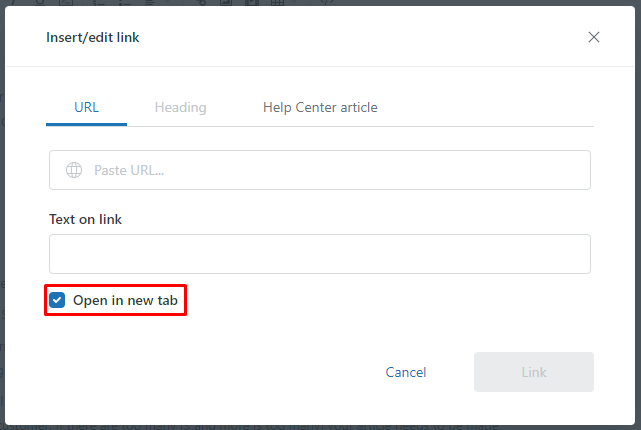
::colend=
::heading=Use of boxes
Use the different boxes in a consistent manner. We recommend:
::note=Use it as a warning of sorts. Should display important information or advice for the customer
::info=Use it to give additional information to a context. When the customer sees this box, he will know that this is an helpful advice to what he is reading.
::important=Use it to display crucial information about the current context. Use it sparingly as not all additional information should be vital to the customer. If there are too many (3 and more is too many) your article either needs to be separated or the flow needs to thought of again, including more information
For more information, consult the article Available commands.
::heading=Use of columns
Use the columns to show information side-to-side such as text aside an image. There is no hard cap on the columns number so please note that the columns width will be calculated with this formula: article width / number of columns.
For more information, consult the article Available commands.
::heading=Use of headings
Use the headings when changing a subject. The heading should be a summary of what the subject will be. Headings are bolded and use large font.
For more information, consult the article Available commands.
::heading=Before publishing
Each article will need to be peer reviewed before being published. David Levasseur will intermittently check on the article to revise and review them. He will then publish it himself or ask other team members to review the article then publish it. To mark an article to review, add [To review] in the title.
0 Comments