
::heading=Problem
The robot goes over the box pick position, but does not attempt to pick it.
::heading=Possible causes
The robot will only attempt to pick a box if one is detected by the box sensor. There are a few causes for a box not to be detected:
- The sensor's sensitivity is not adjusted properly
- The sensor's Light-on / Dark-on switch's state is inverted
- The sensor's signal is not connected to the expected robot's Digital Input (DI)
- The sensor is not provided with a proper 24V power
- The sensor and/or its cable is damaged and cannot provide the signal to the robot.
::heading=Solution
The sensor's sensitivity adjuster and Light-on / Dark-on switch can be adjusted on the sensor until the yellow LED lights turn on when a box is in placed in the expected position. The wiring can also be verified from the following drawing to make sure that it is set correctly.
::note= The robot can only provide 24V to the sensor if the controller is turned on.
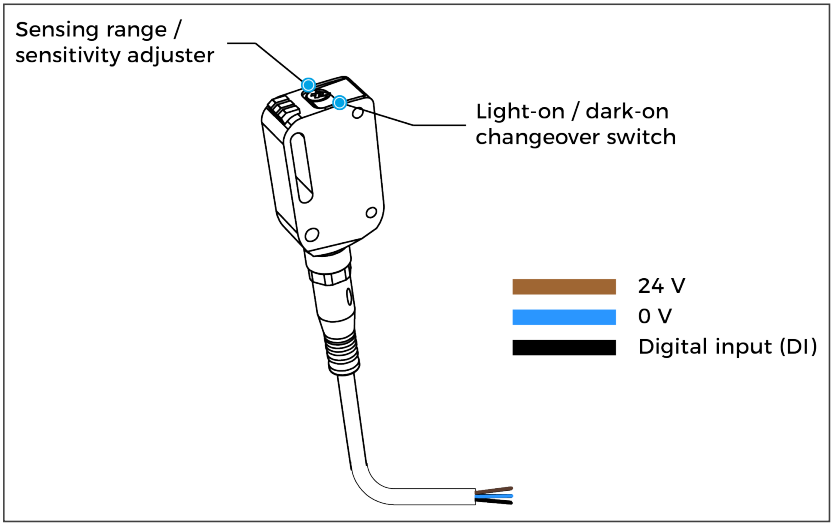
The (DI) signal used by the sensor must match the one used in the palletizing node from the program. To test which (DI) is used, Tap Installation→ I/O Setup and place an object in front of the box sensor to test to validate if the signal changes.
::important=If the sensor never detects a box indicated by a yellow light after all adjustments, the sensor and/or its cable could be defective and Robotiq Support must be contacted for further assistance.
0 Comments